Mar 24, 2012

How to debug the ASP.Net MVC framework

http://weblogs.asp.net/gunnarpeipman/archive/2010/07/04/stepping-into-asp-net-mvc-source-code-with-visual-studio-debugger.aspx

Using Visual Studio symbols and source files makes debugging much easier. I am specially happy about ASP.NET MVC 2 source files because I develop on ASP.NET MVC 2 almost every day. You may also find other useful symbols and source files. In this posting I will show you how to get ASP.NET MVC source to your computer and how to use it.

1. Debug options

Open options dialog and make sure you have check boxes set as on following image in red boxes.

debugoptions

2. Download symbols and source

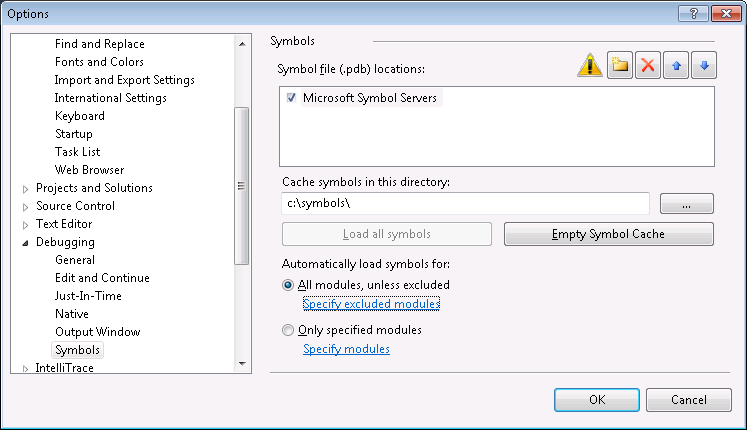
Now we have to allow downloading symbol files. By default the location of symbols is somewhere under application user data folder. I prefer some location on some drive root usually.

debugsymbols

NB! I chose “All modules, unless excluded” to get everything from symbol server. If you need only MVC symbols then choose “Only specified modules” and add System.Web.MVC there (you can also add other modules you need).

After clicking OK you see window like on following image. Make a cup of coffee and wait until symbols are downloaded. It takes a while.

downloadingpublicsymbols

3. Debugging

Open your ASP.NET MVC application, put breakpoint somewhere in code and run it. Wait until code execution hits the breakpoint.

aspnetmvcbreakpoint

When breakpoint is hit click Step-in and Step-over icons to go to some line where some method of ASP.NET MVC is called. On this method click Step-in.

4. Source code download

If ASP.NET MVC source is not there yet then you can see EULA windows like on the following image.

aspnetmvcsourceeula

If you don’t plan to do anything illegal then click Accept button. You may get some warnings about file downloads and UTF-8 encoding. Say Yes and when ASP.NET MVC source is downloaded you can see something like on the following image.

aspnetmvccontrollersource

Well, we are in View() method of controller class. Not bad at all! :)

More symbols

You can find more symbols and source files from Microsoft Reference Source Code Center. For .NET Framework you can find only symbols right now. Hopefully source is also coming soon.

Mar 4, 2012

Installing SQL Server Management Studio for Sql Server 2008 R2 Express

Step by Step Solution for Installing SSME
----------------------------------------------------------
0. If you are using Server 2008, Install Windows PowerShell using these instructions: http://www.tech-recipes.com/rx/2521/windows_server_2008_install_windows_powershell/. Otherwise download and install it from here: http://technet.microsoft.com/en-ca/scriptcenter/dd772288.aspx


1. Download and run the SSME installer from http://www.microsoft.com/downloads/details.aspx?familyid=08e52ac2-1d62-45f6-9a4a-4b76a8564a2b&displaylang=en


2. Click Installation on the left side of the the wizard.


3. Select "New SQL Server stand-alone installation or add features to an existing installation". Click OK.


4. On the Setup Support Files page, select Install.


5. On the Setup Support Rules page, click Next (the Windows Firewall warning is ok).


6. On the Installation Type page of the wizard, select "Perform a new installation of SQL Server 2008", then click Next. (I realize that this is counter-intuitive, but if you select "Add features to an existing instance of SQL Server 2008", you will be met with a greyed out pre-selected option to install the SQL Client Connectivity SDK, and you will not even see an option to install "Management Tools - Basic".) You will see that SQLEXPRESS is recognized as an installed instance.


7. The Product Key screen is all greyed out with the "Specify a free edition" selected. Click Next.


8. Agree to the License Terms as usual. Click Next.


9. On the Feature Selection page, you will FINALLY have a blank checkbox next to "Management Tools - Basic". Put a check in that box. SQL Client Connectivity SDK is selected and greyed out by default; so is the install location. Click Next.


10. Click Next on the Disk Space Requirements screen.


11. Check both boxes to send error info to Microsoft if you wish. I usually do so that they can make the product better. :-) Click Next.


12. Click Next on Installation Rules page if your system passed.


13. Click Install on the Ready to Install page.


14. Hopefully you will see a "Management Tools - Basic Success" message on the Installation Progress page of the wizard. Click Next.


15. You should see a "Your SQL Server 2008 installation completed successfully" message on the Complete page. Click Close.


Sep 13, 2010

WCF Client side Aync Calls: Using BeginXXX EndXXX calls and use the ManualResetEvent for thread marshalling

Sample code:
1. Generate the Proxy with the /async switch
e.g.: svcutil.exe /serializer:DataContractSerializer /async /out:ServiceProxy.cs, "https://www.abcd.com/ServiceHost/UserManagement.svc"

2. Instantiate the proxy client:
e.g.:
UserManagementClient userClient = null;
endPtKey = "UserManagement_WindowsEndpoint";
userClient = new PartnerContactManagementClient(endPtKey);
User[] users = null;

3. Declare and Instantiate the manualresetEvents
e.g.:
ManualResetEvent[] handles = new ManualResetEvent[2];
handles[0] = new ManualResetEvent(false);
handles[1] = new ManualResetEvent(false);

4. Use the BeginXXX / EndXXX way of invoking aync calls:
(The following example is made using anonymous methods, so that we can use the local variables.)
e.g.:
AsyncCallback contactAsyncCallback = delegate(IAsyncResult userResult)
{
try
{
users = userClient.EndLookupUser userResult);
}
catch (Exception ex)
{
exceptions.Add(ex);
}
finally
{
////Set the waithandle signal to true
handles[0].Set();
}
};

////The Begin Invoke Call
int userId = "12345";
contactClient.BeginLookupUser(userId, contactAsyncCallback, null);


5. Make the second such Async call:
e.g.:
UserRoles[] userRoles = null;

AsyncCallback roleAsyncCallback = delegate(IAsyncResult roleResult)
{
try
{
userRoles = userClient.EndLookupUserRoles(roleResult);
}
catch (Exception ex)
{
exceptions.Add(ex);
}
finally
{
////Set the waithandle signal to true
handles[1].Set();
}
};

userClient.BeginLookupUserRole(userid, accountAsyncCallback, null);

6. Wait for the Calls to return:
e.g.:
WaitHandle.WaitAll(handles);
////At this point both the reset event would join back
////Close both the handles manually
handles[0].Close();
handles[1].Close();
////Write the follow up code

Sep 3, 2010

Patterns and Practices: Microsoft Application Blocks

List of all the Microsoft Application Blocks:

1. Data Access Application Block v 2.0:
http://www.microsoft.com/downloads/details.aspx?FamilyId=F63D1F0A-9877-4A7B-88EC-0426B48DF275&displaylang=en

The Data Access Application Block encapsulates performance and resource management best practices and can easily be used as a building block in your own .NET application. If you use it, you will reduce the amount of custom code you need to create, test and maintain.
==========================================================


2. Exception Management Application Block:
http://www.microsoft.com/downloads/details.aspx?displaylang=en&FamilyID=8CA8EB6E-6F4A-43DF-ADEB-8F22CA173E02

The Exception Management Application Block provides a simple yet extensible framework for handling exceptions. With a single line of application code you can easily log exception information to the Event Log or extend it by creating your own components that log exception details to other data sources or notify operators, without affecting your application code. The Exception Management Application Block can easily be used as a building block in your own .NET application.
=======================================================


3. Authorization and Profile Application Block :
http://www.microsoft.com/downloads/details.aspx?familyid=ba983ad5-e74f-4be9-b146-9d2d2c6f8e81&displaylang=en

The Authorization and Profile Application Block provides you with an infrastructure for role-based authorization and access to profile information.
===================================================


4. Aggregation Application Block:
http://microsoft.com/downloads/details.aspx?FamilyId=9058F345-E5FE-42FC-B40B-14EBDD182F48&displaylang=en

The Aggregation Application Block is a .NET Framework extension that allows you to easily manage and coalesce information from various service providers and other systems and present that information to users.
======================================================


5. Asyncronous invocation application block:
http://msdn.microsoft.com/library/en-us/dnpag/html/PAIBlock.asp?frame=true
======================================================

6. Configuration Management Application Block :
http://www.microsoft.com/downloads/details.aspx?familyid=85cb1c53-8ca7-4a92-85e3-e4795bd27feb

The Configuration Management Application Block is an easy to use mechanism through which you can read and write application configuration data.
======================================================

7. Updater Application Block:
http://www.microsoft.com/downloads/details.aspx?familyid=c6c17f3a-d957-4b17-9b97-296fb4927c30

In medium to large organizations, it is common to want to keep all instances of a desktop application up to date with the latest version of executables, libraries, and other files. The Updater Application Block provides an extensible framework that companies can use to create updateable applications
======================================================

8. User Interface Processes Application Block v 2.0:
http://www.microsoft.com/downloads/details.aspx?FamilyId=98C6CC9D-88E1-4490-8BD6-78092A0F084E&displaylang=en

The User Interface Process Application Block provides a simple yet extensible framework for developing user interface processes. It is designed to abstract the control flow and state management out of the user interface layer into a user interface process layer.
=====================================================


9. Web Services Facade for legacy applications:
http://msdn.microsoft.com/library/en-us/dnpag/html/WSFacadeLegacyApp.asp?frame=true
=====================================================


10. Caching Application Block:
http://microsoft.com/downloads/details.aspx?FamilyId=B55164C9-94C8-4077-AA29-AFE4074746DE&displaylang=en

The Caching Application Block has been designed to encapsulate Microsoft's recommended best practices for caching in .NET applications
=====================================================


11. Smart Client Offline Application Block:
http://www.microsoft.com/downloads/details.aspx?FamilyId=BD864EB5-56B3-43A5-A964-6F23566DF0AB&displaylang=en

The Offline Application Block, is intended to serve as an architectural model for developers who want to add offline capabilities to their smart client applications.
=====================================================


12. Logging Application Block:
http://www.microsoft.com/downloads/details.aspx?FamilyId=24F61845-E56C-42D6-BBD5-29F0D5CD7F65&displaylang=en

This block is a reusable code component that uses the Microsoft Enterprise Instrumentation Framework (EIF) and the Microsoft .NET Framework to help you design instrumented applications.
=======================================================


13. Persistent Asynchronous Invocation Application Block :
http://microsoft.com/downloads/details.aspx?FamilyId=794EC811-B5EA-46AE-BAA4-69A3DEADD38E&displaylang=en

The Microsoft Asynchronous Invocation Application Block manages asynchronous communication between a Web client and one or more foreign service providers (FSP).
===========================================================

Other important links:
1. Microsoft Patterns and Practices Application Blocks and Enterprise Library, in ASP.Net Forums :
http://forums.asp.net/122.aspx

2. An Introduction and Overview of the Microsoft Application Blocks, in 4GuysFromRolla.com :
http://www.4guysfromrolla.com/articles/062503-1.aspx

3. Patterns and Practices in Msdn :
http://www.4guysfromrolla.com/articles/062503-1.aspx

4. Microsoft Enterprise Library 5.0 – April 2010 in Msdn:
http://msdn.microsoft.com/en-us/library/ff632023.aspx

5. Microsoft Enterprise Library 5.0 – April 2010 in Codeplex:
http://entlib.codeplex.com/
http://entlib.codeplex.com/wikipage?title=EntLib5%20Beta1

Aug 6, 2010

Configuring Your ASP.NET 2.0 Site

1. For configuration of Asp.net applications and Web sites and for Role Management: (Use the default WSAT tool)
http://www.developer.com/net/asp/article.php/3569166/Configuring-Your-ASPNET-20-Site.htm

2. For configuring the Asp.Net MVC Applicationsand for Role Management: (Use the MVC WSAT tool)
http://wsat.codeplex.com/

3. For Configuring WCF Roles:
http://weblogs.asp.net/spano/archive/2007/03/12/how-to-implement-a-wcf-authorization-manager-using-azman.aspx

Problem: Intellisense missing in Visual Studio


1. Open Tool>Options

2. Goto Text Editor>All Languages

3. In the Right Hand pane Check the "Auto List members"

4. Uncheck "Hide advanced members"

5. Check the "Parameter Information"

6. Click "OK"


You're done

Setup Web Admin Tool for Production Servers

I have been able installed WebAdminTool for Production Servers using the following steps:

Create a virtual directory ASP.NETWebAdminFiles in IIS that point to C:\WINDOWS\Microsoft.NET\Framework\v2.0.50727\ASP.NETWebAdminFiles

Open properties windows of the new virtual directory, make sure that it is configured to run with ASP.NET 2.0, and in Security tab, uncheck Anonymous Access, check Integrated Windows Authentication.

After that, you will be able to connect to WebAdminTools using the following syntax
http://localhost/ASP.NETWebAdminFiles/default.aspx?applicationPhysicalPath=XXX&applicationUrl=/YYY
in my case, it is:
http://localhost/ASP.NETWebAdminFiles/default.aspx?applicationPhysicalPath=D:\Tasks\Libranyon\Photonyon\&applicationUrl=/Photonyon

Although I don't recommend to do it, if you want to access WebAdminTool from other computer, open WebAdminPage.cs from (C:\WINDOWS\Microsoft.NET\Framework\v2.0.50727\ASP.NETWebAdminFiles\App_Code) and comment the following code block
if (!application.Context.Request.IsLocal) {
SecurityException securityException = new SecurityException((string)HttpContext.GetGlobalResourceObject("GlobalResources", "WebAdmin_ConfigurationIsLocalOnly"));
WebAdminPage.SetCurrentException(application.Context, securityException);
application.Server.Transfer("~/error.aspx");
}
WebAdminTool still be protected by Intergrated Windows Authentication, so you still some have some defense here.

Jun 12, 2009

How to run a C# application as an administrator

To have your C# (or any .NET program) run as Administrator in Windows, you'll have to create a manifest for it.
Step 1:
Add a manifest file to your app.
Solution Explorer>Rightclick>Add>"New Item">"Application Manifest File"


Step2 : Manipulate the default manifest file as follows

Just change the highlighted attribute from a"asInvoked" to "requireAdministrator"


Step 3: Make your app to use the manifest
[If Not using Visual Studio]
1. Rename it to (YourEXEName).manifest. The .NET Framework when executing the file will see the Manifest and handle its contents.
2.Embed the .manifest file into you EXE. This can be done by executing the following command line:
1.mt -manifest YourProgram.exe.manifest -outputresource:YourProgram.exe
2.If your assembly is strong named, you will be unable to embed the manifest into it as it would invalidate the strong naming.
[If using Visual Studio]
1. Dont have to do anything more...
2. Just remember to run the Visual Studio as an Administrator, for future debugging.

Jun 11, 2009

BackgroundWorker Class and usage examples

BackgroundWorker Class:
Brief Defn: Executes an operation on a separate thread(MSDN).
Detailed Defn: The BackgroundWorker class allows you to run an operation on a separate, dedicated thread. Time-consuming operations like downloads and database transactions can cause your user interface (UI) to seem as though it has stopped responding while they are running. When you want a responsive UI and you are faced with long delays associated with such operations, the BackgroundWorker class provides a convenient solution.

To execute a time-consuming operation in the background, create a BackgroundWorker and listen for events that report the progress of your operation and signal when your operation is finished. You can create the BackgroundWorker programmatically or you can drag it onto your form from the Components tab of the Toolbox. If you create the BackgroundWorker in the Windows Forms Designer, it will appear in the Component Tray, and its properties will be displayed in the Properties window.

To set up for a background operation, add an event handler for the DoWork event. Call your time-consuming operation in this event handler. To start the operation, call RunWorkerAsync. To receive notifications of progress updates, handle the ProgressChanged event. To receive a notification when the operation is completed, handle the RunWorkerCompleted event.

Note:
You must be careful not to manipulate any user-interface objects in your DoWork event handler. Instead, communicate to the user interface through the ProgressChanged and RunWorkerCompleted events.

BackgroundWorker events are not marshaled across AppDomain boundaries. Do not use a BackgroundWorker component to perform multithreaded operations in more than one AppDomain .

If your background operation requires a parameter, call RunWorkerAsync with your parameter. Inside the DoWork event handler, you can extract the parameter from the DoWorkEventArgs..::.Argument property.
---------------------------------------------------
Usage:

This class can be added both by code and also by using the toolbox
Usage 1: Simple invocation
////Declaration and Instantiation
BackgroundWorker Worker = new BackgroundWorker();

////Add the event handlers in the Constructor
public Form2()
{
InitializeComponent();
Worker.DoWork += new DoWorkEventHandler(Worker_DoWork);
Worker.RunWorkerCompleted += new RunWorkerCompletedEventHandler(Worker_RunWorkerCompleted);
}

/////The Do work method is performed in a Async/multithreaded way when the
////RunWorkerAsync method of the background worker is invoked.
////N.B.: No UI Control manipulation is permitted.
void Worker_DoWork(object sender, DoWorkEventArgs e)
{
// Do not access the form's BackgroundWorker reference directly.
// Instead, use the reference provided by the sender parameter.
BackgroundWorker bw = sender as BackgroundWorker;

// Extract the argument.
int arg = (int)e.Argument;

// Start the time-consuming operation.
e.Result = TimeConsumingOperation(bw, arg);

// If the operation was canceled by the user,
// set the DoWorkEventArgs.Cancel property to true.
if (bw.CancellationPending)
{
e.Cancel = true;
}
}

////This is the method which is automatically called when the async thread has completed its work.
private void Worker_RunWorkerCompleted(object sender, RunWorkerCompletedEventArgs e)
{
if (e.Cancelled)
{
// The user canceled the operation.
MessageBox.Show("Operation was canceled");
}
else if (e.Error != null)
{
// There was an error during the operation.
string msg = String.Format("An error occurred: {0}", e.Error.Message);
MessageBox.Show(msg);
}
else
{
// The operation completed normally.
string msg = String.Format("Result = {0}", e.Result);
MessageBox.Show(msg);
}
}

=============================================================
Usage 2: Implementing BackgroundWorker with Progress Bar
http://msdn.microsoft.com/en-us/library/waw3xexc.aspx


Jun 5, 2009

Consuming and Publishing RSS feeds

1. http://www.code101.com/Code101/DisplayArticle.aspx?cid=48
2. http://www.dotnetcurry.com/ShowArticle.aspx?ID=137&AspxAutoDetectCookieSupport=1
3. http://www.c-sharpcorner.com/UploadFile/pwright/RssFeedProject12062005000807AM/RssFeedProject.aspx
4. http://aspalliance.com/919_Awesome_ASPNET_20_RSS_ToolKit_Released.1 -- (Detailed Tutorial)
5. http://blogs.msdn.com/dmitryr/archive/2006/02/21/536552.aspx

WCF certificate authentication with IIS7

1. http://romualdas.spaces.live.com/blog/cns!DCDC5E439E70339D!1006.entry
2. http://social.technet.microsoft.com/Forums/en-US/winserversecurity/thread/3bfd8974-ac8a-4c53-ade8-e8b71713f92a
3. http://forums.iis.net/
4. http://notgartner.wordpress.com/2007/09/06/using-certificate-based-authentication-and-protection-with-windows-communication-foundation-wcf/

Creating a WSE 3.0 Enabled Web Service (Tutorial)

http://dotnetslackers.com/articles/aspnet/GettingStartedCreatingWSEEnabledWebService.aspx

IIS 7 SSL Certificate Installation

1. http://pro-studio.spaces.live.com/blog/cns!7CEDD8FA2A6B9050!746.entry
2. http://www.experts-exchange.com/Software/Server_Software/Email_Servers/Exchange/Q_23860405.html
3. http://help.godaddy.com/article/4801

N.B.: If you are going to install a certificate which has a p7b extension, then rename it to .cer before u start.

Jun 2, 2009

Create Digital Signature for your App

If your application does not have a digital signature and has uiAccess=true in its manifest, it will fail with "A referral was returned from the server."

Applications that request uiAccess=true must have a valid, trusted digital signature to execute.

Also, applications by default must reside in a trusted location on the hard drive (such as windows or program files) to receive the uiAccess privilege. They will still run if they are not in one of these locations, but they will not receive the privilege. You can disable this security feature through the local security policy mmc snap-in.

If you want to create a trusted "test" certificate to sign your application with so that you can use your application on your current machine, here's how:

NOTE: These instructions assume you have visual studio installed and are using a command prompt that has all the environment variables set to find SDK utilities such as makecert and signtool. If not, you will need to find these tools on your hard drive before running them.

***

1) Open an elevated command prompt

- Click start

- Find Cmd Shell or command prompt

- Right-click, click Run As Administrator

2) Create a trusted root certificate

- Browse to the folder that you wish to contain a copy of the certificate

- In the command shell, execute the following commands:

makecert -r -pe -n "CN=Test Certificate - For Internal Use Only" -ss PrivateCertStore testcert.cer

certmgr.exe -add testcert.cer -s -r localMachine root

3) Sign your file

- In the command shell, browse to the location of your exe

- In the command shell, type:

SignTool sign /v /s PrivateCertStore /n "Test Certificate - For Internal Use Only" /t http://timestamp.verisign.com/scripts/timestamp.dll APP.exe

Where APP.exe is your application.

Feb 26, 2009

.Net 3.0 - C# - Features and Additions

Some of the interesting and intruiging additions were:
  • Implicitly typed local variables
  • Anonymous types
  • Extension methods
  • Object and collection initializers
  • Lambda expressions
  • Query expressions
  • Expression Trees
  • Linq
Links:
1 http://blah.winsmarts.com/2006/05/17/demystifying-c-30--part-1-implicitly-typed-local-variables-var.aspx
2. Lambda Expressions:
http://blogs.msdn.com/ericwhite/pages/Lambda-Expressions.aspx
3. Lambda Expressions:
http://www.developer.com/net/csharp/article.php/3598381

Feb 9, 2009

C# "Orcas" Language Features (from Scott Guthrie's blog)

Automatic Properties, Object Initializers, and Collection Initializers
-------------------------------------------------------------------------------------------
Automatic Properties
If you are a C# developer today, you are probably quite used to writing classes with basic properties like the code-snippet below:
public class Person

{
private string _firstName;
private string _lastName;
public string FirstName
{
get
{
return rn _firstName;
}
set
{
_firstName = value;
}
}

public string LastName
{
get
{
return _lastName;
}
set
{
_lastName = value;
}
}
}
Note about that we aren't actually adding any logic in the getters/setters of our properties - instead we just get/set the value directly to a field. This begs the question - then why not just use fields instead of properties? Well - there are a lot of downsides to exposing public fields. Two of the big problems are: 1) you can't easily databind against fields, and 2) if you expose public fields from your classes you can't later change them to properties (for example: to add validation logic to the setters) without recompiling any assemblies compiled against the old class.
The new C# compiler that ships in "Orcas" provides an elegant way to make your code more concise while still retaining the flexibility of properties using a new language feature called "automatic properties". Automatic properties allow you to avoid having to manually declare a private field and write the get/set logic -- instead the compiler can automate creating the private field and the default get/set operations for you.
For example, using automatic properties I can now re-write the code above to just be:
public class Person

{
public string FirstName
{
get;
set;
}
public string LastName
{
get;
set;
}
}
Or If I want to be really terse, I can collapse the whitespace even further like so:
public class Person

{
public string FirstName { get; set; }
public string LastName { get; set;
}

How does this work?
Well if I try to decompile the code using Reflector then we would see that we have this following code for the class Personinternal

class Person
{
// Fields
[CompilerGenerated
private string k__BackingField;

[CompilerGenerated]
private string k__BackingField;
// Methods
public Person();
// Properties
public string FirstName
{
[CompilerGenerated]
get;
[CompilerGenerated]
set;
}

public string LastName
{
[CompilerGenerated]
get;
[CompilerGenerated]
set;
}
}
Looks the like the following code was generated by the compiler ... I am still not clear how the "k__BackingField" expression is used in sync with the compiler generated attribute, but I am happy that I have such a shortcut.

N.B.: Those Automatic Properties are even faster to type, when you use Code Snippets:Type "prop", press TAB twice and then just type in the datatype and identifier to the placeholders.
I like also that the classes (typically DTOs) stay clean when using the Automatic Properties.
It is also very easy to copy the properties to interface specifications (or vice versa): just delete or add the access modifiers.

Object Initializers

When the C# "Orcas" compiler encounters an empty get/set property implementation like above, it will now automatically generate a private field for you within your class, and implement a public getter and setter property implementation to it. The benefit of this is that from a type-contract perspective, the class looks exactly like it did with our first (more verbose) implementation above. This means that -- unlike public fields -- I can in the future add validation logic within my property setter implementation without having to change any external component that references my class.
Bart De Smet has a great write-up on what happens under the covers when using automatic properties with the March CTP release of "Orcas". You can read his excellent blog post on it here.
New C# and VB Language Feature: Object Initializers
Types within the .NET Framework rely heavily on the use of properties. When instantiating and using new classes, it is very common to write code like below:
Person person = new Person();
person.FirstName = "Scott";
person.LastName = "Guthrie";

Have you ever wanted to make this more concise (and maybe fit on one line)? With the C# and VB "Orcas" compilers you can now take advantage of a great "syntactic sugar" language feature called "object Initializers" that allows you to-do this and re-write the above code like so:
Person person = new Person { FirstName="Scott", LastName="Guthrie" };


The compiler will then automatically generate the appropriate property setter code that preserves the same semantic meaning as the previous (more verbose) code sample above.
In addition to setting simple property values when initializing a type, the object initializer feature allows us to optionally set more complex nested property types. For example, assume each Person type we defined above also has a property called "Address" of type "Address". We could then write the below code to create a new "Person" object and set its properties like so:
Person person = new Person {
FirstName = "Scott",
LastName = "Guthrie",
Address = new Address
{
Street = "One Microsoft Way",
City = "Redmond",
State = "WA",
Zip = 98052
}
};
Bart De Smet again has a great write-up on what happens under the covers when using object initializers with the March CTP release of "Orcas". You can read his excellent post on it here.

Collection Initializers

New C# and VB Language Feature: Collection Initializers
Object Initializers are great, and make it much easier to concisely add objects to collections. For example, if I wanted to add three people to a generics-based List collection of type "Person", I could write the below code:
List people = new List();
people.Add( new Person { FirstName = "Scott", LastName = "Guthrie" } );
people.Add( new Person { FirstName = "Bill", LastName = "Gates"} );
people.Add( new Person { FirstName = "Susanne", LastName = "Guthrie"} );

Using the new Object Initializer feature alone saved 12 extra lines of code with this sample versus what I'd need to type with the C# 2.0 compiler.
The C# and VB "Orcas" compilers allow us to go even further, though, and also now support "collection initializers" that allow us to avoid having multiple Add statements, and save even further keystrokes:
List people = new List
{
new Person { FirstName = "Scott", LastName = "Guthrie"},
new Person { FirstName = "Bill", LastName = "Gates"},
new Person { FirstName = "Susanne", LastName = "Guthrie"}
};
When the compiler encounters the above syntax, it will automatically generate the collection insert code like the previous sample for us.